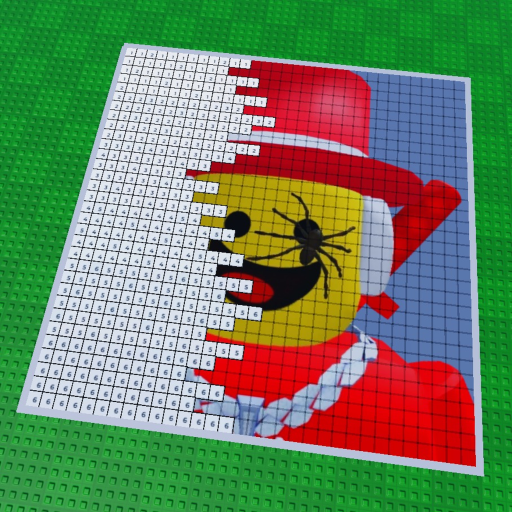
Choose a clear icon
Start with a recognizable friend or celebrity subject rather than an overly complex image.
The central Paint your Friends! mechanic is deliberately easy to understand: put a recognizable icon on the canvas, then follow the numbered color pattern until the image appears.
The Paint your Friends numbered canvas turns a friend’s or celebrity’s icon into a block-by-block task: load the icon, claim a plot, and paint each block with the color the canvas asks for. Keep the subject simple for a first session, then share the finished creation.
Paint your Friends! is not presented as a combat game or an economy simulator. Its public Roblox description focuses on a visual task. You start with an icon, see it translated into a canvas, and work through the picture block-by-block. The numbered structure gives the session a gentle rhythm: find the requested color, place it where the canvas expects it, and watch a face or familiar image emerge.
For a first painting, choose an icon with a clear silhouette and a few obvious color families. A simple subject helps a group understand the canvas before anybody tries to optimize. It also makes it easier to agree on what “finished” means. The official description does not publish a universal block count or a required completion time, so do not turn a personal estimate into a game rule.
The description says players can paint alongside one another in real time. That makes the best group plan a human one: choose a shared subject, claim a plot, and talk about which visible area each person is working on. If the room becomes confusing, pause and name the next block rather than assuming a hidden ownership or speed system.
When the art is complete, share the creation. The description also says paintings save automatically, but it does not describe recovery windows or save intervals. A screenshot is still a sensible backup for a piece that matters.
Start with a recognizable friend or celebrity subject rather than an overly complex image.
Use the canvas as the authority for each block. The site does not add an unverified color formula.
Let automatic saving do its job and keep a screenshot of a finished piece you want to remember.
The official public metadata lists a maximum of 7 players. That is a planning ceiling, not a recommendation to fill every space. A smaller group can make a shared canvas easier to read.
Open plannerUse the painting guide for an ordered path or the friend guide for a shared room.
The public description presents the game as a coloring-by-number experience: a loaded icon becomes a canvas and players paint it block-by-block.
The official description mentions friends’ or celebrities’ icons. It does not publish a broader image import specification.
No public speed formula is included in the checked record. Use the completion planner only for numbers you can see or choose yourself.
Yes. The description says players can paint alongside other players in real time.