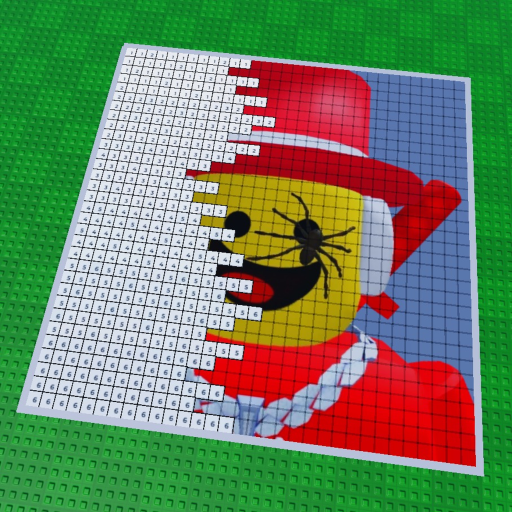
How to paint yourself or your friends in Roblox.
Paint your Friends! is built around a simple creative loop: load your own, a friend’s, or a celebrity’s icon, follow the color-by-number canvas block-by-block, and share the result.
Quick answer
If you searched for how to paint a friend in Roblox Paint your Friends, this Paint your Friends beginner guide starts with the official experience: claim a plot, then load your own, a friend’s, or a celebrity’s icon. Paint each numbered block in the requested color. The public description also says you can paint beside other players in real time and that paintings save automatically.
Keep the first session light.
- GamePaint your Friends!
- Server sizeUp to 7 players
- SubjectYourself, a friend, or a celebrity
- Core actionColor numbered blocks
Pick one clear goal.
Decide whether your session is about painting your own avatar, finishing a friend's icon, creating something beside friends, or simply learning the canvas. That one decision keeps the first visit enjoyable and prevents you from searching for systems the game does not publicly promise.
Set a session checkpointHow to paint yourself in Paint your Friends
Choose your own Roblox avatar when the game asks for a subject, then use the same numbered-canvas flow as any friend or celebrity icon. “Draw yourself” is part of the official Roblox description; the public source does not promise a separate self-portrait mode, reward, or shortcut.
For the canvas mechanics behind that process, read the paint-by-number guide. If other people are joining the room, the multiplayer guide explains how to coordinate the session.
From plot to finished art.
The Paint your Friends claim a plot step is the first clear checkpoint: choose an available space before you load the subject.
Open the official experience
Join from the official Roblox page and confirm the title is Paint your Friends! before you start.
Claim a plot
Choose an available plot and give the group a clear place to work. The public description specifically tells players to claim a plot.
Load a subject
Pick your own Roblox avatar, a friend’s icon, or a celebrity’s icon to turn into a painting. A familiar, simple subject is easiest for a first session.
Paint the numbered blocks
Follow the color-by-number canvas block-by-block. Work steadily and compare the emerging image instead of rushing for an unsupported speed target.
Share and leave a record
When the painting feels finished, share the creation and keep a screenshot of art that matters to you.
What makes a first canvas harder than it needs to be?
- Starting with a complicated subject before you know how the blocks read.
- Changing the subject or plan halfway through a shared session.
- Assuming a speed, reward, or canvas-size formula that the public game description never states.
- Leaving a treasured finished piece without a screenshot, even though saving is described as automatic rather than explained in detail.
Return to the last visible action.
If the canvas feels confusing, pause and identify the numbered block directly in front of you. If the group is scattered, agree on one subject and one plot. If you are looking for a code or currency, check the code status and official source record rather than trusting a similar game's guide.
Keep painting, or bring in a friend.
Painting questions
What should I paint first?
Choose your own avatar or a familiar friend or celebrity icon with a simple outline so the first block-by-block session is easy to follow.
Can I paint myself in Paint your Friends?
Yes. The official Roblox description says you can draw yourself, your friends, or a celebrity. Choose your own Roblox avatar when you load the subject, then follow the numbered canvas block-by-block.
How do I start a painting?
Join the official experience, claim a plot, and load an icon onto the canvas before following its color-by-number blocks.
Can someone paint beside me?
Yes. The public description says players can paint alongside other players in real time. Coordinate the subject before you begin.
Will my painting save?
The public description says paintings save automatically. Because it does not publish a save interval, keep a screenshot of a finished piece you care about.